OKR HUB
Role
OKR System Owner · Product Designer · No-Code Developer
Industry
Technology · Organizational Operations
Duration
16 weeks
Building an OKR System From Zero
Digital Aid Seattle had no OKR system when this project started. Teams had no shared language for setting or tracking goals, and there was nothing to learn from internally.
The first step was not building software. It was building OKR literacy, for myself and for the org.
Building the Framework from the Ground Up
I learned OKRs through conversations with DAS leadership and assigned readings, then turned that into a process I could run across 14 teams at once.
I interviewed 9 team leads individually to understand their grasp of OKRs, the goal-setting strategies they were already using, and how they communicated priorities to their own teams. From there, I worked with each team to write their Objectives, iterating on feedback until each one was clear and well-scoped, then repeated the process for Key Results.
Once every team’s goals were defined, the question became: how do people actually see and update this, day to day?


From a Spreadsheet to a User-Centered System
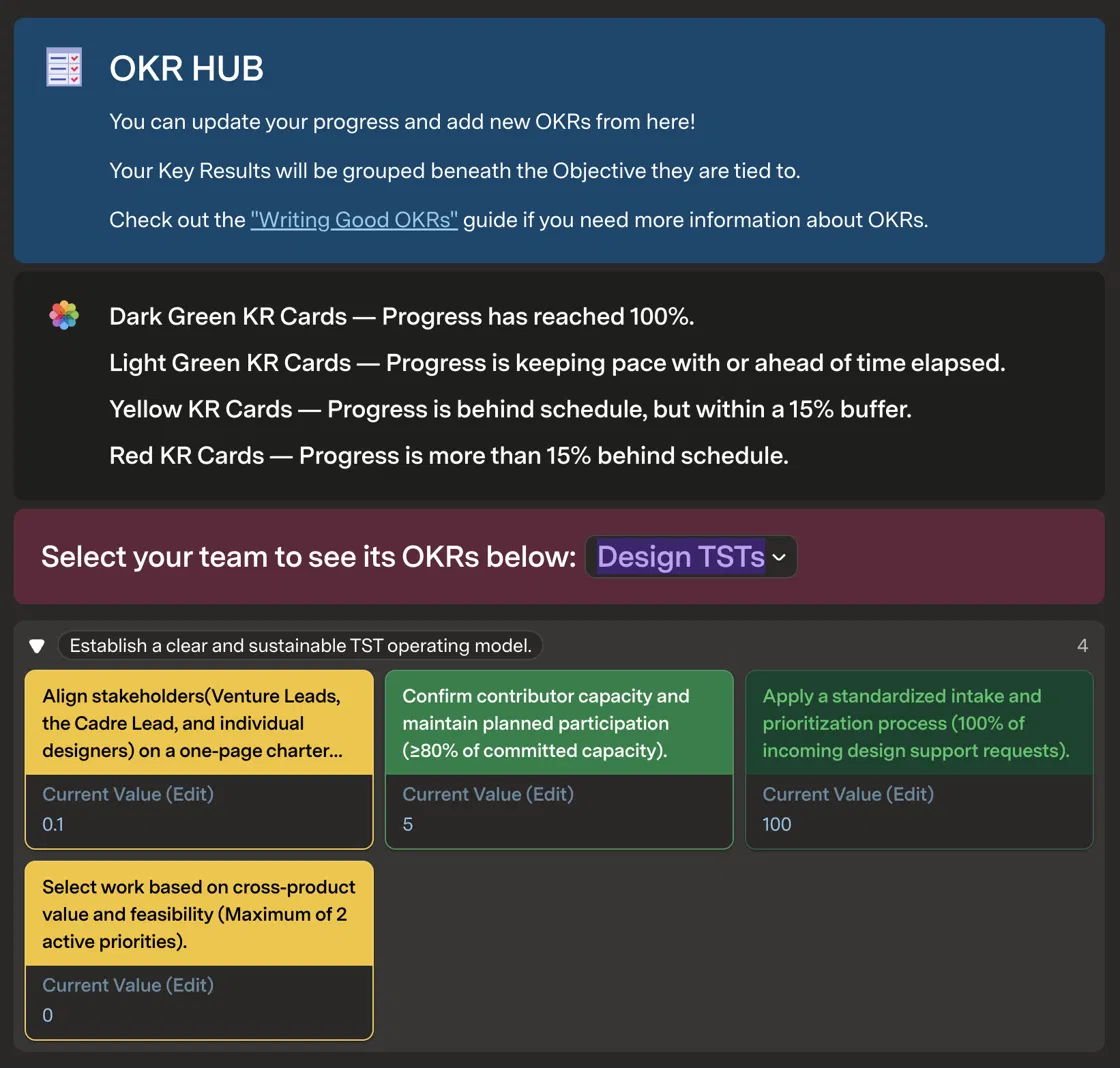
The first version of this tool was intentionally minimal, a spreadsheet-like table in Coda, just to get every team’s Objectives and Key Results structured in one place. From there, I iterated toward the interface shown above: KRs grouped under their Objective, a team selector so each user only sees their own goals, and a status color (dark green, light green, yellow, red) computed automatically from how progress compares to time elapsed.
Building the Backend
Underneath the interface, I designed and built the full database structure the system runs on: separate tables for Objectives, Key Results, Teams, and Volunteers, linked by relations so a KR always stays tied to its parent Objective and team. Every form submission, whether a new OKR, an edited Current Value, or a baseline, writes directly into these tables, so the interface is always reading live data rather than a static snapshot.
Each card’s Current Value is editable directly from the card, and an Edit Objective button opens the linked Objective for updates, so teams can correct outdated goals or missing fields themselves, without needing admin help for routine changes.
Add a New OKR
Beyond editing what already existed, teams needed a way to submit entirely new OKRs themselves, rather than routing every addition through me. I built this as a two-step form:
New Objective Entry captures the Objective text, an OKR Priority (Mandatory or Stretch, as a radio choice), and the Quarter it belongs to
New Key Results Entry links a KR to its parent Objective, then captures the KR text alongside its Metric Type, Target Value Metric (the unit being measured), Start Value, and Target Value
Requiring the Metric Type and target fields at submission, rather than leaving them for later, is what makes every KR’s progress bar accurate from the moment it is created.
But submission alone didn’t account for OKRs that were already written manually before this system existed, many of which had never been quantified. That meant building a separate way for teams to go back and set a baseline for KRs still missing one.